Java and Kotlin bytecode, native libraries and their JNI bridges, and on iOS the Mach-O binary including frameworks and extensions in the archive.
DexProtector: mobile app protection for Android and iOS
DexProtector protects Android and iOS apps and SDKs against reverse engineering, tampering, malware, and runtime attacks.
 evaluated and approved SBMP SPT
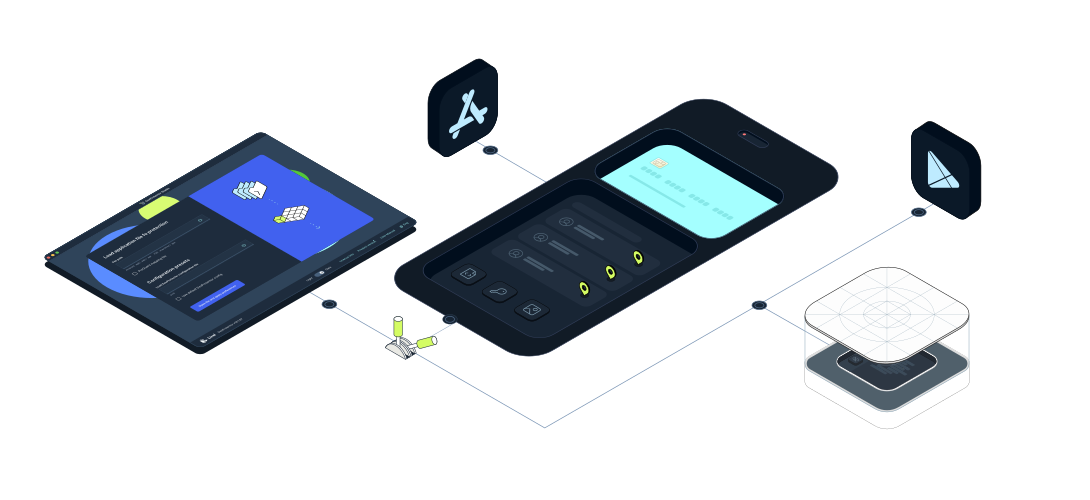
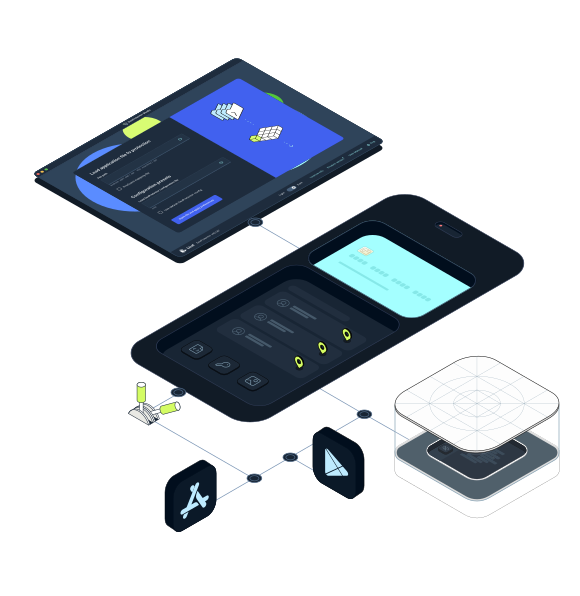
Static and dynamic protection for the app itself, and fraud and abuse protection for the threats around it. DexProtector runs as a step in your build pipeline and operates on your own infrastructure.
12 billion+
protected app instances to date
6 years
consecutive EMVCo evaluation and approval
75+
countries where DexProtector is deployed
since 2011
protecting mission-critical mobile apps
DexProtector protects applications for Tier-1 banks, payment providers, wallet issuers, and national digital identity programs.
Applications and libraries for Android, Pixel Watch, Android TV, and Android Things, from 5.0 through to the latest version.
Applications and libraries for iOS and Apple Watch, from 13.0 through to the latest version.
DexProtector 16.1.97
The latest version of DexProtector brings clearer context to iOS security events in Alice and improves protection compatibility across Android and iOS.
read updateWhat DexProtector protects
DexProtector secures your app, verifies its integrity, watches the environment it runs in, and protects what it sends to your backend. It also defends against fraud and abuse: malware on the device, data leaving the screen, automated attacks on your API, and fraud during identity verification.
Static and dynamic protection
You'll see these called app shielding, mobile app hardening, mobile binary protection, or in-app protection. The names vary, but the problem doesn't.

Code hardening
DexProtector encrypts and obfuscates your compiled code, native libraries, and resources, so that decompiled output yields nothing an attacker can work with.
Stops:
static reverse engineering, code lifting, key and secret extraction, IP theft

Integrity control
Decryption keys are never stored in the protected app. Cryptographically-based integrity controls are bound to context-sensitive keys calculated at the point of protection. So if anything has been modified, the keys are wrong and protected code stays encrypted.
Stops:
repackaging, cloning, malicious code injection, patched binaries, removal of security controls

Runtime protection (RASP)
The DexProtector Runtime Engine initializes before your app's own code, verifies the environment at launch, and continues checking in the background while the app runs.
Stops:
dynamic analysis, runtime manipulation, instrumentation, N-day platform exploits, automation-driven abuse

Network communication hardening
The DexProtector Runtime Engine validates the server certificate chain through its own clean-room implementation rather than relying on the platform’s, so the channel between your app and your backend can’t be observed or intercepted.
Certificate transparency enforcement extends to Android 5.0 and above, beyond what the OS provides natively.
Stops:
man-in-the-middle attacks, traffic interception, API abuse, forged and injected certificates, downgrade attacks, proxy-based analysis
Fraud and abuse protection
The protections above assume an attacker is going after your app. These cover the attacks that go around it.

Mobile API protection
To help counter fraud and bots, the DexProtector Runtime Engine generates a JWT attestation token when your app requests it. Your backend validates the token, runtime evidence, and single-use nonce before authorizing sensitive API operations
Stops:
bot attacks, credential stuffing, scripted account creation, replay, requests from repackaged or emulated clients

Anti-malware
Enables your app to detect and respond to known malware and potentially harmful applications present on the device, using signatures from the Alice Threat Intelligence Malware Database, updated over the air.
Stops:
banking trojans, remote access tools, spyware, accessibility service abuse, overlay and tapjacking attacks

eKYC fraud prevention
Identity verification relies on the camera, sensors, and application all being genuine. DexProtector detects the tools that can enable bogus ones to appear legitimate and fool the liveness checks.
Stops:
injected video streams into liveness checks, synthetic identity onboarding, location spoofing, automated account creation

Data leakage prevention
Sensitive data can leave your app without anything being compromised; mirrored to an external display, captured in a screenshot, typed into a third-party keyboard, or read from storage on a lost device.
Stops:
screenshots and screen recordings of sensitive screens, mirroring to external displays, keystroke capture by third-party keyboards, extraction of credentials and tokens from a lost or compromised device
“DexProtector, with Mobile API Protection, Anti-Malware and the tamper-proof telemetry Alice delivers into our fraud engine, is now foundational to how we secure our app. We moved onboarding and ATO fraud from a constant battle to effectively zero, and we now see attacks coming before they land.”
Risk Executive of a European digital bank
What’s at stake?
Attackers don't need to breach your infrastructure. They can compromise, clone, or impersonate your app instead; and manipulate the signals your backend receives.
A repackaged app sends valid API requests. A hooked runtime returns whatever an attacker wants it to return. A virtual camera presents a synthetic face to a liveness check. A malware-controlled session looks, from the backend, like a legitimate user doing legitimate things. Backend fraud systems are making decisions on evidence they cannot verify.
DexProtector closes that gap by establishing trust where the transaction actually begins: on the device, inside the app, before the request is ever sent.
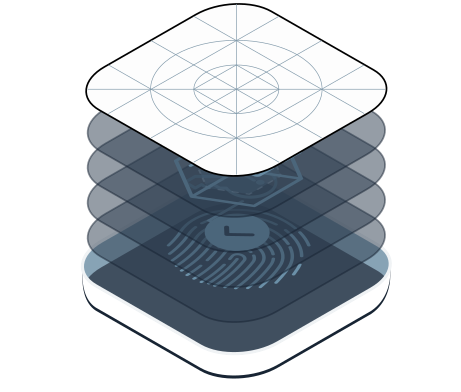
Four layers of mobile app protection, each one covering what the others can’t
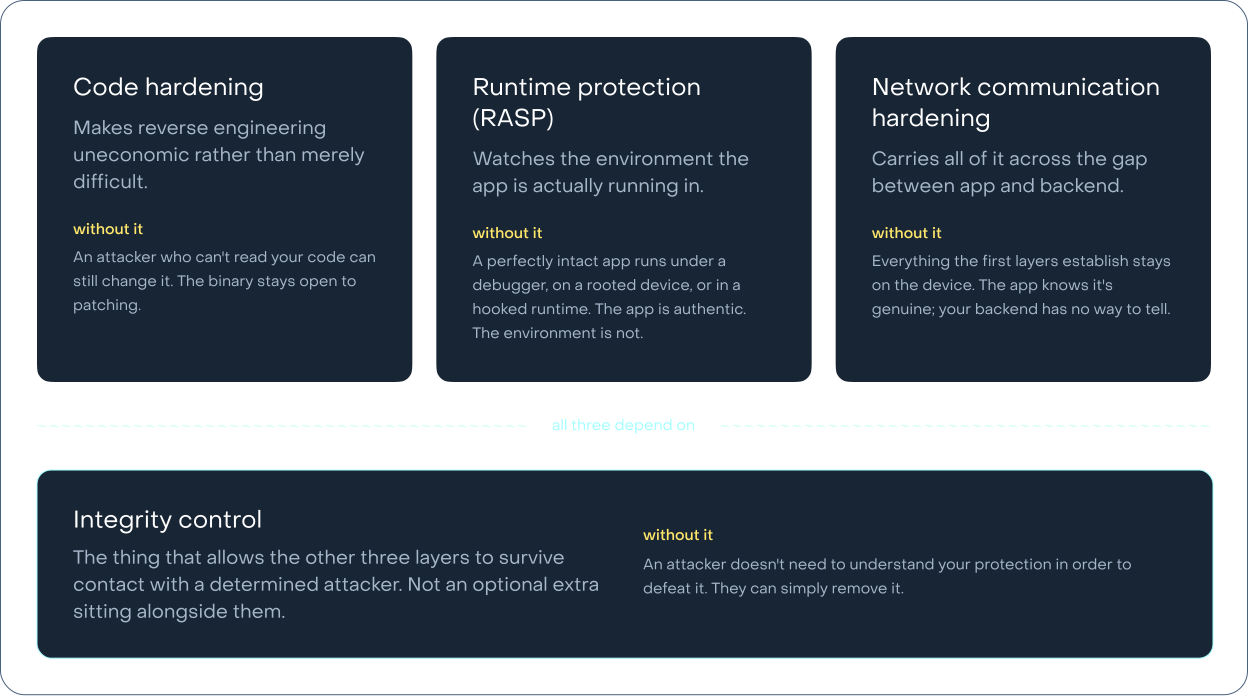
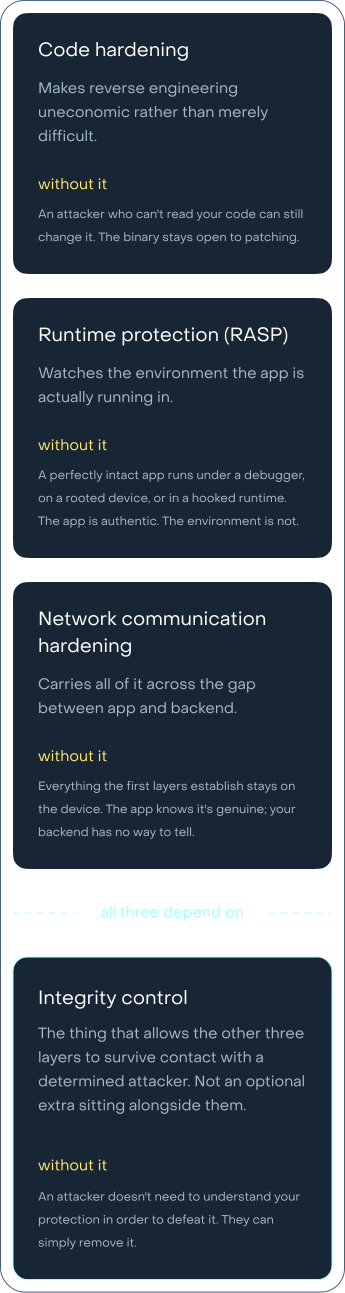
No client-side defense is permanently unbreakable. The goal is economic: make attacks cost more than they are worth, and make sure that when one layer is bypassed, the next one catches it.
That principle is why we keep making each mechanism more resilient, and it's also why, for the most critical applications, hardening alone is no longer the whole answer. Attacks are more automated and more adaptive than they used to be, and so the response has to extend beyond the app and into the intelligence that tells you what's happening across your install base, and the isolation that protects the operations you can't afford to lose.
What goes in, and what comes out
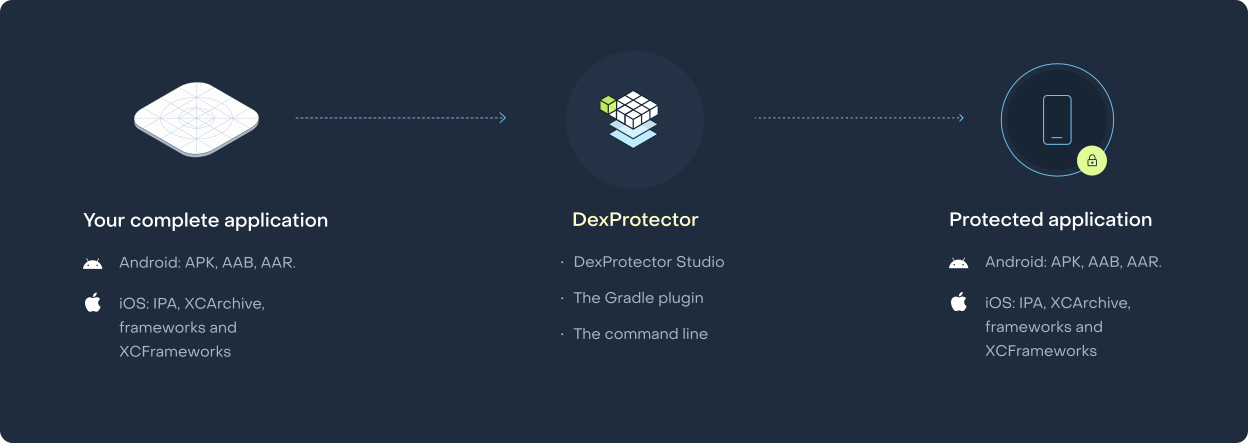
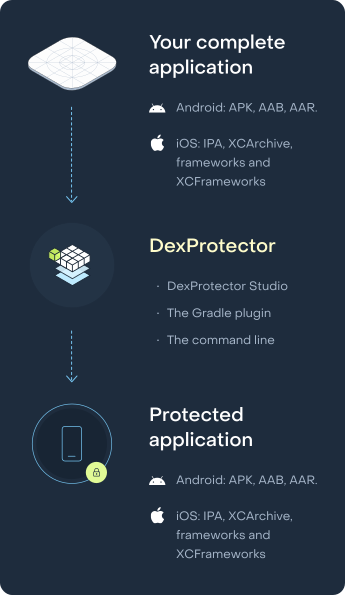
DexProtector protects the final container; the artifact your users download and attackers reverse engineer. Android: APK, AAB, AAR. iOS: IPA, XCArchive, frameworks and XCFrameworks. You provide the release build; you get back a protected version that distributes exactly as the original would have.
Protection is applied after the build completes. No source changes, no SDK to integrate, no build-system surgery. That means it works on code you didn't write — acquired applications, outsourced development, legacy builds — and updates independently of your release cycle.
Why the final container matters
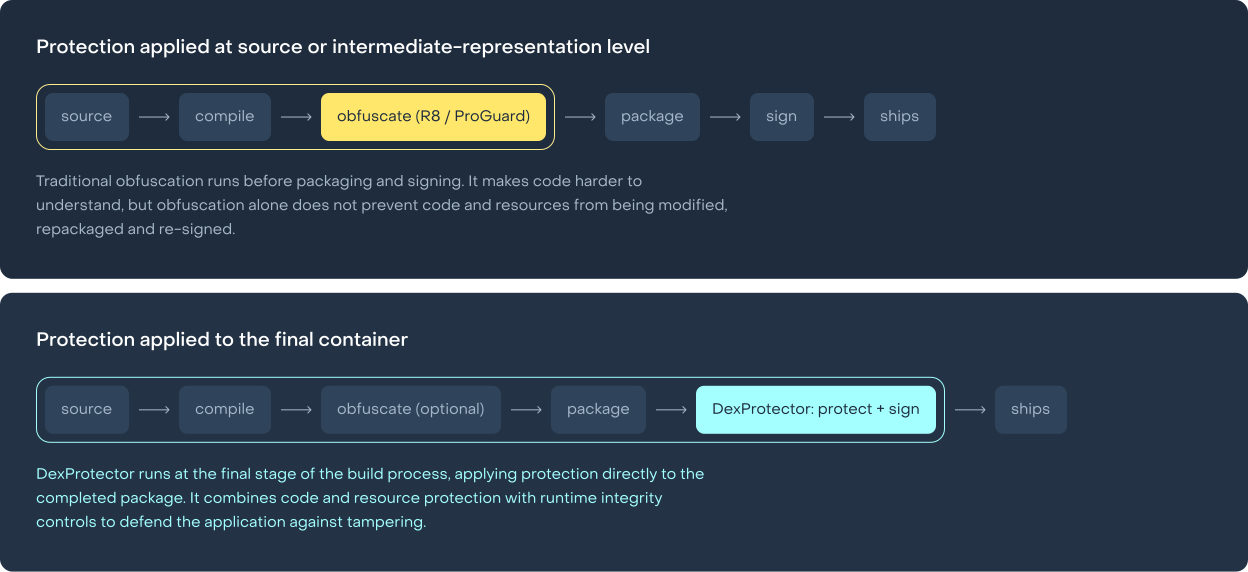
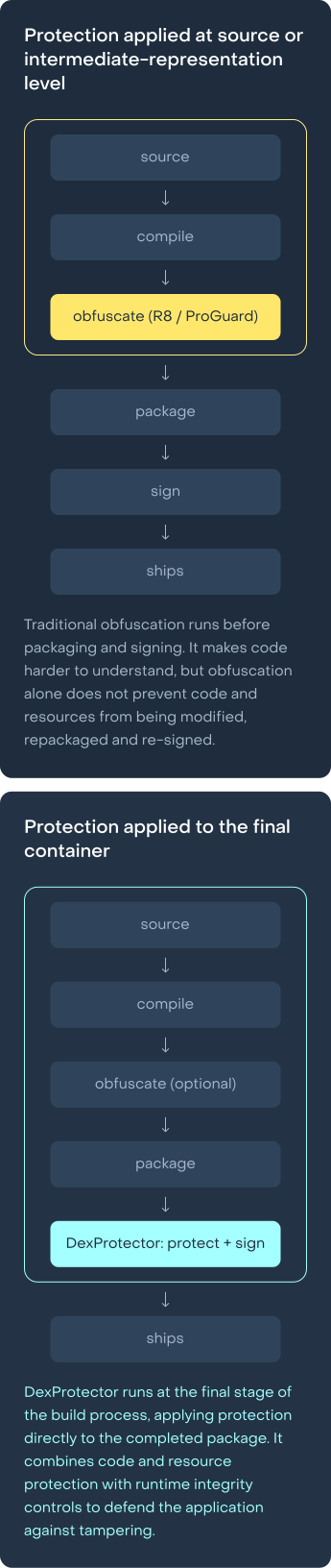
Most mobile app obfuscation tools work at source or intermediate-representation level, then hand the result back to a pipeline where signing, packaging, and resource processing continue to modify the artifact. Whatever integrity guarantees existed at the point of obfuscation are gone by the time the app ships.
DexProtector’s encryption keys are unique to each protection run and are never stored in the protected app. They’re derived at runtime from the app’s own file contents together with device attestation and integrity data. Modify that container — repackage it, patch it, resign it — and the derived keys are wrong. Protected code and assets stay encrypted, and the app cannot run. This isn't a policy setting but rather a property of binding protection to the artifact that actually ships, and it's only possible when protection is applied to the final container.
What's protected
 Code
Code
 Embedded material
Databases, model files, and the cross-platform code files that Flutter, React Native, Cordova, Ionic, NativeScript, and Xamarin apps ship as assets.
 Resources and assets
The app’s root, res, and assets folders, string resources and resource names in resources.arsc, and component names in the manifest.
App Bundles
An AAB is not an APK. Play generates device-specific APKs from the bundle, which breaks naive protection: integrity checks computed against the bundle don't match the split APKs users actually receive. DexProtector supports AAB as a first-class input, protecting base and feature modules, surviving Play's split generation, and delivering integrity verification on the device-specific APKs that reach handsets.
SDKs
If you publish an SDK, your code ships inside binaries you don't control, integrated by teams whose security practices you can't see. A protected SDK has to defend itself without assuming a friendly host, including inside a harness app an attacker built specifically to instrument it. DexProtector protects the AAR, framework, or XCFramework directly, preserving the public API exactly so integration is unchanged for your customers.
Unprotected app in, protected app out. On premises, in an environment you control.
Three ways to integrate easily:
DexProtector Studio
for interactive configuration and analysis
The Gradle plugin
for Android CI/CD
The command line
for everything else, including air-gapped build environments
build.gradle
       plugins {
  id "com.licel.dexprotector" version "16.1.87"
}
dexprotector {
  licenseFile = file("dexprotector.licel")
  configFile  = file("dexprotector.xml")
}
DexProtector is applied automatically as an additional step in your build pipeline, without any changes to your source code. After that it’s very low-maintenance.
The DexProtector Runtime Engine API is there when you want the app to act on what it finds, such as retrieving check results, or the signed session token your backend verifies.
DexProtector Studio
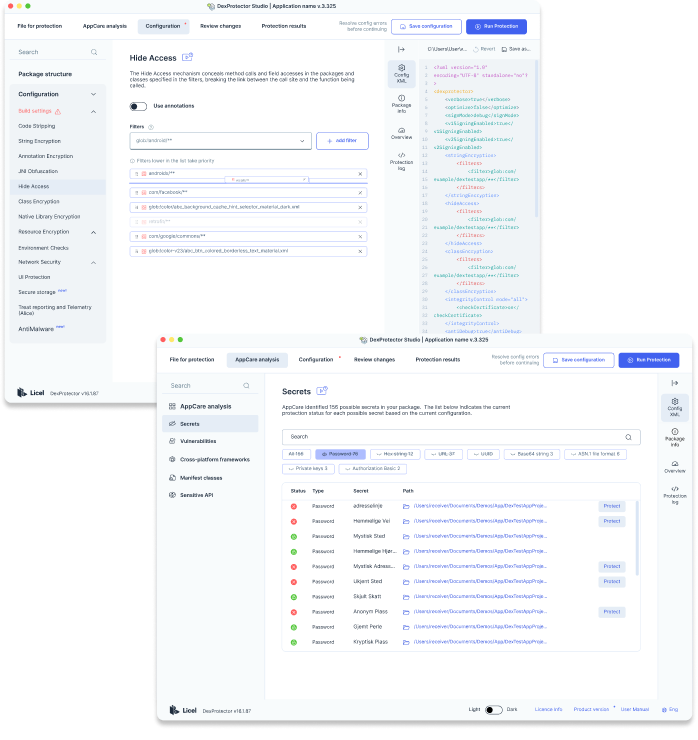
You can't protect what you can't see. DexProtector Studio analyzes your compiled application and identifies where sensitive material actually lives — hardcoded constants, embedded key material, cryptographic API calls, resource files carrying secrets — then suggests the protection configuration those findings call for.
This matters because the alternative is asking your development team to trace every code path that touches signing logic and remember every place a secret was embedded. Protection coverage gets directed by analysis rather than by recollection.
On-premises, by design
The entire protection process runs inside your own environment. Your unprotected APK, AAB, IPA, or XCArchive never crosses your network boundary. No third party holds your pre-release binary or knows your release schedule.
The consequences are practical rather than philosophical. The build you protect is the most sensitive version of your app that will ever exist, so sending it to an external service creates the exposure you bought protection to prevent. Banks, payment providers, and public-sector bodies frequently cannot ship pre-release binaries to external processors at all, which makes the conversation with your compliance team a short one. And because there’s no protection service, there’s nothing to authenticate against, no rate limits, and no vendor cloud for your release pipeline to wait on.
Performance
DexProtector is engineered to run fast and stay stable because instability at 12 billion installation instances is not an option. Performance overhead is measured continuously.
“We had a negative experience with a previous supplier, and as a result we feared that it might be quite a lengthy and arduous process to implement Licel’s solutions. Thankfully these fears were not realized.
We were able to set up DexProtector on both iOS and Android - with all the protection mechanisms we required - in around one month.
Updates are communicated clearly, and the Licel team is always available to help with evolving security challenges we’re looking to solve.”
Mobile Security Product Owner of a European digital bank
Native, hybrid, and cross-platform
Cross-platform apps ship their application logic as bundled files; JavaScript, .NET assemblies, Dart. DexProtector encrypts those files as resources using white-box cryptography, and the DexProtector Runtime Engine decrypts them on demand at runtime. The same mechanism that protects your native code protects your framework code, with no separate integration path.
-
 Flutter
-
 React Native
-
 Xamarin
-
 Cordova
-
 Ionic
Ionic
-
 NativeScript

Applications and libraries for Android, Pixel Watch, Android TV, and Android Things, from 5.0 through to the latest version.

Applications and libraries for iOS and Apple Watch, from 13.0 through to the latest version.
Claims about protection strength are cheap. Evaluations aren't.
What Licel holds:
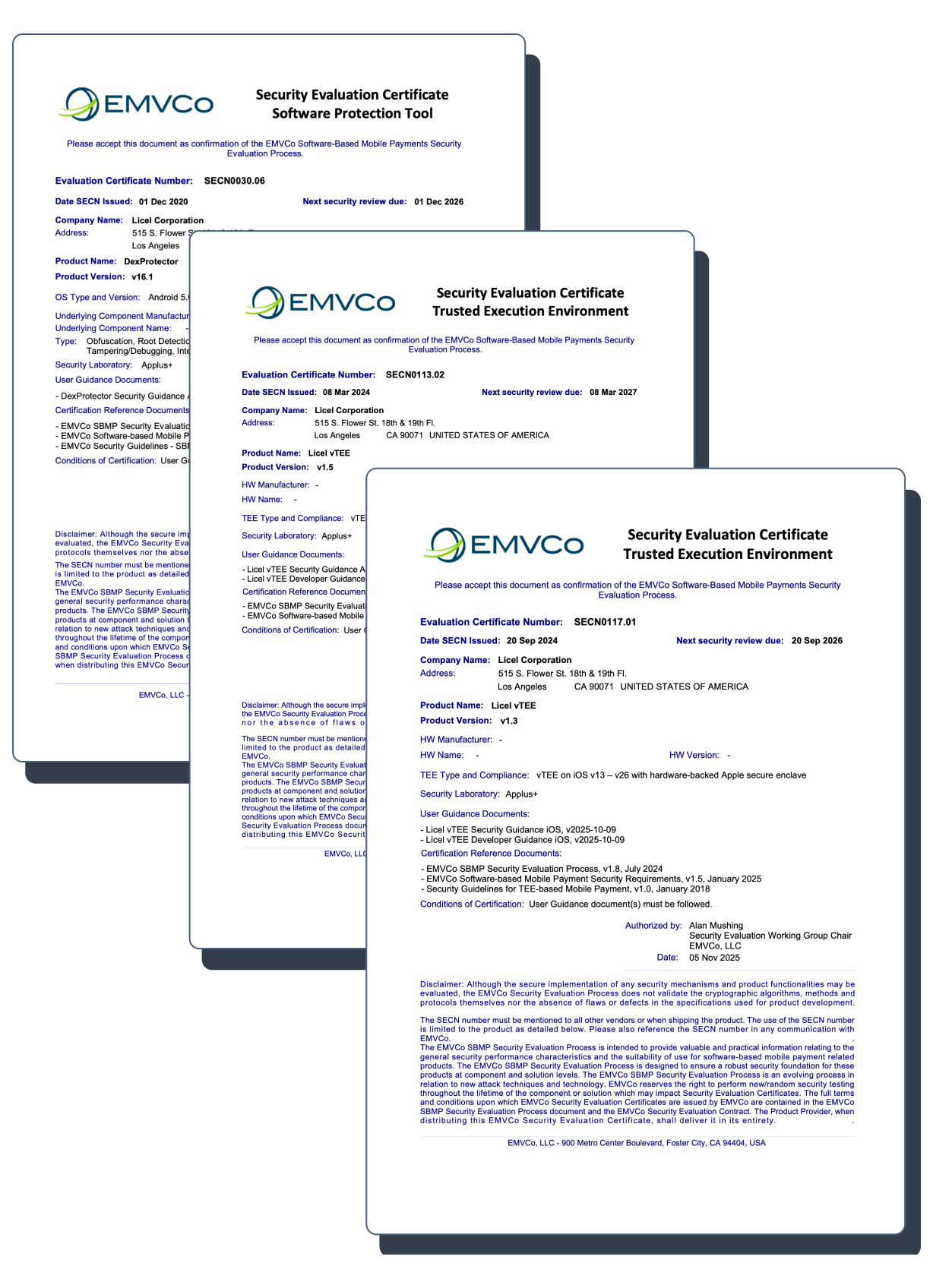

EMVCo evaluation and approval (SBMP SPT).
DexProtector has been evaluated and approved under EMVCo's Software-Based Mobile Payment security program for six consecutive years, by accredited independent security laboratories. This is the standard payment schemes rely on for SoftPOS and mobile payment acceptance.
DexProtector was the first software protection tool approved by EMVCo for both Android and iOS. (December 1, 2020.)
Approvals are renewed annually and lapse if they aren’t.

ISO/IEC 27001:2022
Licel's information security management system is certified to ISO/IEC 27001:2022.

Cyber Trust Mark
Licel holds the Cyber Trust Mark at the highest tier (Tier 5, Advocate).
What DexProtector helps you address
Licel holds the approvals above. Institutions achieve conformance. The distinction matters, and a vendor who blurs it is asking you to inherit a claim that was never theirs to make.
DexProtector is deployed inside solutions that meet the following standards and frameworks, and addresses the software protection requirements each of them sets out.
- EMVCo SBMP — for mobile payment wallets. DexProtector has been evaluated and approved under EMVCo’s Software Protection Tool (SPT) programme for six consecutive years.
- PCI MPoC for SoftPOS and mobile payment acceptance — helps to protect payment apps and SDKs against tampering, reverse engineering, and runtime attacks.
- PCI Secure Software — supports integrity and sensitive data protection for payment software and SDKs.
- OWASP MASVS — supports mobile app security through hardening, threat detection, device integrity checks, and API protection.
- ENISA EUDIW Cybersecurity Certification Scheme — support for schemes that are helping to protect digital identity wallets against tampering and runtime threats.
- PSD2 RTS on SCA — helps to meet the mobile authentication flow and device compromise protection obligations these regulations place on payment service providers.
- GDPR - supports personal data security via data leakage prevention and network communication hardening.
- IEC 62443-4-2 - Supports software integrity and secure communications in industrial applications.
Integrity, Intelligence, Isolation

DexProtector
The app defends itself and proves it’s genuine. Hardened against reverse engineering, resistant to tampering, aware of the environment it’s running in, and able to prove to your backend that it’s authentic.
That matters beyond the app itself. Fraud systems act on signals the app sends, and those signals are only as trustworthy as the environment they came from. An attacker who can manipulate the app or its runtime can suppress detections, alter signals, or feed misleading information to your fraud systems. Protecting the app is what makes its signals worth acting on.
Two solutions sit beyond it, and they exist because defending the same applications against the same adversaries since 2011 highlighted the need for full mobile channel protection.

Alice Threat Intelligence
Alice’s trusted sensors are embedded directly into the protected app, and hardened by DexProtector’s anti-tampering mechanisms. They carry DexProtector’s detections — tampering, debugging, hooking, rooting, emulators, and malware packages — to the Alice backend, where the hardening means the arriving telemetry can be trusted.
Alice turns those signals into something a fraud team can act on: which environments are instrumented, where repackaging attempts originate, which attack tools are trending across your install base, and how a given device, session, and user relate to one another over time.
Enabling Alice is a configuration step rather than an engineering project, because the sensors are already deployed.

The Licel vTEE
Some operations need more than a hardened application around them. Key handling, PIN entry, request authorization, token generation, and transaction binding, for example.
The Licel vTEE isolates those operations in a separated execution context inside the app. It doesn't make a mobile device equivalent to a hardware secure element, and it isn't a replacement for one. What it does is extend the hardware root of trust through the parts of a sensitive workflow that hardware alone cannot cover, reducing the exposure of critical logic to the ordinary application layer and making dynamic abuse substantially harder.
Adopting it doesn’t mean a separate integration. The vTEE CryptoModule runs inside an instance of the Licel vTEE, providing white-box cryptography and logical isolation, and it’s integrated and configured through DexProtector. It addresses the software-protected cryptography requirements defined by PCI MPoC and EMVCo SBMP.
The Licel vTEE is also independently evaluated and approved by EMVCo, under its SBMP TEE program.
Mobile Channel Protection
The application defends and verifies itself. Its signals become intelligence. Its most sensitive operations run in isolation. Together that's mobile channel protection, securing the entire interaction between user, device, application, and backend, rather than the code alone.
read the guide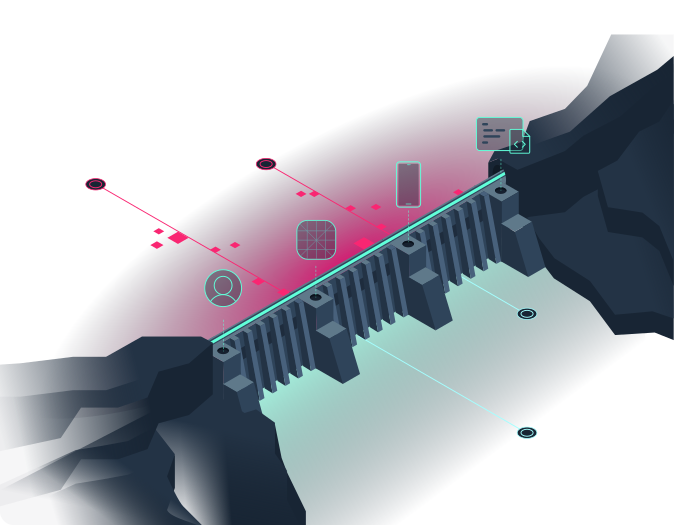
FAQs
Integration and distribution
Is ProGuard or R8 enough to protect my app?
R8 and ProGuard shrink, optimize and rename code, which can make analysis harder. They don’t provide the encryption, integrity controls or runtime threat detection needed for comprehensive application protection. DexProtector works alongside them, adding protection to your existing build process.
Do I have to upload my app to a cloud service?
No. DexProtector protects Android and iOS packages within your own build environment. The protection process runs offline, including in air-gapped environments, so you don’t need to send your unprotected app to an external protection service.
Does DexProtector work with Android App Bundles?
Yes. DexProtector accepts AAB files directly and supports Google Play’s app bundle distribution workflow. It also supports protected Android SDKs delivered through Dynamic Feature Modules, allowing modular delivery with integrity and runtime protection.
Does DexProtector work with Play App Signing?
Yes. Configure DexProtector for Google Play App Signing using your upload key details and the SHA-256 fingerprint of the app signing certificate. DexProtector checks the certificate used to sign the app delivered to users. Test this configuration through a Google Play testing track so the installed app carries the expected signature.
Can I submit a DexProtector-protected iOS app to the App Store?
Yes. DexProtector produces protected, signed iOS packages for your distribution workflow. Your app still goes through Apple’s normal review, and approval depends on its functionality, behavior and compliance with the App Review Guidelines. Apple’s App Review Guidelines
Can DexProtector work alongside other protection tools?
DexProtector supports integration with R8 and ProGuard. Combining it with another app shielding or runtime security product requires assessment of the specific combination. Tools that modify the same binaries or install overlapping runtime checks can interact, so build order and protection settings should be validated together.
Can DexProtector protect an SDK rather than an app?
Yes. DexProtector protects Android AARs and iOS frameworks and XCFrameworks. Protection can be configured to keep the SDK’s public API accessible while securing its implementation. Integration follows the protected SDK’s packaging requirements; for iOS, this includes the generated companion framework.
How quickly do you support new iOS and Android versions?
Production support covers official Android and iOS releases. We begin compatibility testing during the early developer preview and beta stages and work closely with major device manufacturers and platform vendors to identify and address compatibility issues before general availability.
For prerelease testing, beta support is limited to the latest available beta of each upcoming operating system release
Performance and operations
Can I keep using Crashlytics, Sentry or another crash-reporting service?
Yes. DexProtector does not alter your application's stack traces, so integration with crash reporting tools such as Firebase Crashlytics and Sentry is transparent. Your existing crash reporting and symbolication workflows continue to work as usual.
How much does DexProtector affect app performance?
The impact depends on your app, the enabled protection mechanisms and the devices it runs on. DexProtector provides configurable protection filters so you can tune the coverage of sensitive code and assets. Measure startup time and critical user journeys with your intended production configuration to establish the impact for your app.
How much does DexProtector add to app size?
The size increase depends on the protection configuration, included runtime components and target architectures. Measure both the download size and installed size of your protected release. For Android App Bundles, compare the packages delivered to equivalent devices, since the full bundle size does not represent an individual user’s download.
Which CPU architectures does DexProtector support?
DexProtector for Android supports x86, x86_64, ARM32 (armeabi-v7a) and ARM64 (arm64-v8a).
For iOS frameworks and XCFrameworks, DexProtector protects ARM64 binaries for devices.
Does DexProtector support Android TV and Wear OS?
Yes. DexProtector protects applications and libraries for Android TV and Wear OS (formerly Android Wear), extending app and SDK protection to smart TVs and wearable devices.
Protection and detection
What happens when a threat is detected?
Depending on the threat and your configured security policy, DexProtector can block the execution of sensitive operations or allow the app to continue running. Security events can also be reported to Alice Threat Intelligence for monitoring and investigation.
How does DexProtector protect code and resources?
DexProtector uses different techniques to encrypt string literals and annotations, virtualize method calls, obfuscate JNI methods, encrypt entire classes on Android and class metadata on iOS, and encrypt resources. The keys used in this process are dynamically calculated during application startup and runtime and depend on application integrity.
Fraud and abuse prevention
How does my backend verify that a request came from a protected app?
With Mobile API Protection, the app supplies short-lived, cryptographically signed tokens with API requests. Your backend validates them and applies its app integrity and version policy before granting access. This helps reject requests from unauthorized clients and tampered apps.
Do I still need Mobile API Protection if I already use TLS and user authentication?
Yes. User authentication establishes who is making a request, while TLS protects the connection. Mobile API Protection adds checks on the app making that request. Backend authorization, rate limits and replay controls remain essential parts of the overall API security design.
Can DexProtector detect virtual camera apps and other identity-fraud tooling?
Yes. DexProtector detects known virtual camera apps and provides runtime checks for hooking and code injection that can interfere with identity verification flows. These protections help strengthen eKYC alongside your identity provider’s liveness and biometric checks.
Does DexProtector detect malware on the user’s device?
Yes. On Android, AntiMalware detects known malicious or potentially harmful apps, including banking trojans, spyware and fraud tooling, using intelligence from Alice's malware database. It also detects non-system accessibility services, helping protect against abuse of accessibility features.
Can DexProtector help protect users against remote-access fraud?
Yes. DexProtector provides protection against Remote Access Tools (RATs), VNC exploits, overlay attacks and activity hijacking. These controls help defend sensitive app interactions against software that attempts to observe, impersonate or take control of the user’s session.
Data leakage prevention and visibility
What is Data Leakage Prevention?
Data Leakage Prevention helps protect sensitive information displayed or entered in your app through screen capture protection, anti-keylogging and input event analysis. Combined with encrypted local storage and device binding, these controls help reduce opportunities for sensitive data theft.
Can DexProtector block screenshots, screen recording and screen mirroring?
Yes. DexProtector provides screen capture protection for Android and iOS, covering screenshots, recording and casting. These controls help keep sensitive app content out of captured or mirrored output. Available behaviour depends on the platform, OS version and protection configuration.
Can DexProtector feed threat signals into our fraud-monitoring systems?
Yes. When configured to report to Alice Threat Intelligence, protected apps provide security signals for investigation, correlation and fraud assessment. Alice’s dashboard and Enterprise API help teams connect those signals with their existing risk workflows, and its SIEM integration supports security operations.
Every release, documented
DexProtector ships every few weeks. Every release is documented: what changed, which detections were added, which indicators moved between report-only and enforcing, and what to check before you upgrade.
DexProtector 16.1.97
The latest version of DexProtector brings clearer context to iOS security events in Alice and improves protection compatibility across Android and iOS.
read update
Talk to us
If you're evaluating mobile application protection, or reconsidering an approach you already have, we're happy to have a straightforward conversation about your threat landscape and whether DexProtector fits.
Try it on your own app
We issue a free trial license so your team can run a proof of concept in your own environment. Typically around two weeks, with our engineers on hand throughout.